Every Repo Boots, Even Without a DDEV Config
Knecht now builds the environment from the repo files when there is no DDEV config. A dev server becomes the live preview, with hot reload.
Until now a repo needed a .ddev/config.yaml, or Knecht could not boot it. Since version 0.10 Knecht builds the environment from the files in the repo when there is no config. A dev server becomes the live preview, hot reload included. This post explains what Knecht detects, how the preview gets through, and what we learned about DDEV, Docker Compose and Nuxt along the way.
What Knecht Detects
At the start of every run Knecht reads the files from the checkout that define the versions anyway:
Where nothing is set, the DDEV default applies. The run log names every value with its source, for example PHP 8.2 from composer.json, Node 22 from .nvmrc.
The Generated Config
From those values Knecht writes a .ddev/config.yaml into the checkout. For a Nuxt repo that pins Node 22 and has no composer.json, it looks like this:
#knecht-generated
name: knecht-run-42
type: php
docroot: ""
webserver_type: generic
php_version: "8.4"
nodejs_version: "22"
omit_containers:
  - db
corepack_enable: true
disable_settings_management: true
The project type is php, because DDEV makes no CMS assumptions for it. The web server is generic, so neither nginx nor php-fpm runs, since without a website there is nothing to serve. The database container is left out, Corepack is enabled, and DDEV writes no settings files into the repo. Ports, environment variables and daemons go into Knecht's own override files next to it, as with every project. More on those below.
Knecht needs the comment on the first line so that on every further run it can tell for sure that this is a project without its own DDEV config, even though there is one in the checkout now.
The marker also makes sure none of this ends up in a commit. The Git actions in a run commit everything that is in the checkout. So before the first run Knecht writes the .ddev/ directory into the clone's .git/info/exclude file. That is an ignore list that applies only to this clone and is not part of the repo itself, Git treats its entries like a .gitignore. For a repo with its own config only Knecht's own files go in there, for a generated one the whole directory, because DDEV also drops files into it on start. Which case applies, Knecht reads off the marker.
Package Manager
npm is part of the DDEV image and the default when the repo sets nothing else. Corepack is enabled in every generated environment, so pnpm and yarn run without an install. Corepack downloads the version from the packageManager field, nothing has to be installed in the repo.
bun is missing from the image. Knecht adds one line to the image build that installs bun through npm. The layer stays in the Docker cache, only the first bun session on a server builds it.
The downloads of all four go into DDEV's server-wide cache. DDEV points Composer, npm and Corepack there itself, Knecht adds the paths for the pnpm store, yarn and bun, for every project, including one with its own DDEV config. A server downloads each package once, later sessions install from the cache.
Node Version
Concrete versions like 22 or v20.11 are taken up to the minor version, nvm code names like lts/iron as their major version. Moving targets like lts/* or latest are not pinned. The default applies then, with a warning in the run log. engines.node in package.json is usually a range like >=20. If the DDEV default satisfies the range, it stays, otherwise Knecht takes the highest LTS version that does.
PHP Version
The choice is the versions of the DDEV image, currently 5.6 to 8.4. Composer constraints like ^8.1 or >=8.1,<8.3 are translated into a semver range, and Knecht takes the highest version that satisfies it. If none does, the default applies, with a warning in the run log.
The Result in the Settings
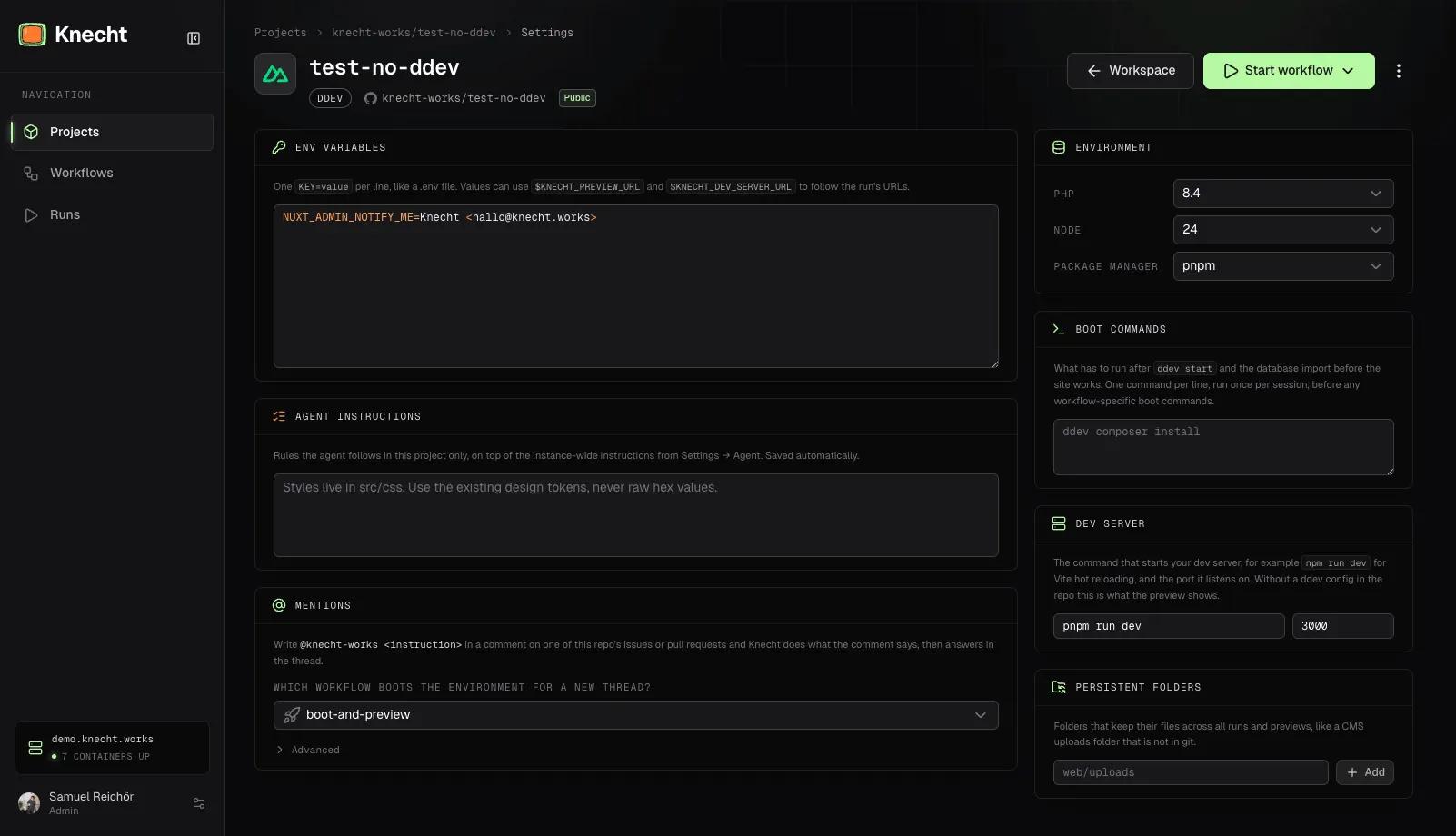
The "Environment" card in the project settings shows the detected values with their source. If you want, you pick a different PHP version, a different Node version or a different package manager there. Detection already runs when you connect the repo, through the GitHub API and with the same logic as the boot. Warnings, for example about a constraint no version satisfies, show up in the card as well.
Preview
A generated environment has no website. That is why there is a "Dev Server" card with the command that starts the dev server, for example npm run dev, and its port. Knecht starts it after the boot commands and serves it as the session's preview. The command receives the preview URL as KNECHT_PREVIEW_URL. Without a dev server the environment boots without a preview. Changes to the "Environment" and "Dev Server" cards take effect with the session's next run.
Hot Reload
Hot reload works in the preview like it does locally, without changes in the repo. Getting a Vite dev server through took some work, though.
The Daemon in the Container
The dev server runs as a daemon under supervisord in the web container, the way DDEV intends for web_extra_daemons. Knecht adds it to its override file, together with the forwarder from the next step:
web_extra_daemons:
  - name: knecht-dev
    command: bash -lc 'npm run dev'
    directory: /var/www/html
  - name: knecht-forward
    command: knecht-forward 41000 3000
    directory: /var/www/html
The command runs in a login shell so the image's profile applies. DDEV starts the daemon right after ddev start, before the boot commands have run npm ci. So the first start dies, and supervisord gives up after a few attempts. Knecht restarts the daemon group after the boot commands and then polls until something answers on the port. Only then does the preview count as ready.
The Forwarder
Vite, Nuxt and Next bind to 127.0.0.1 only by default. The preview proxy reaches the container from outside though, through its IP on the Docker network. So a small forwarder runs next to it as a second daemon, a Node script of a few lines. It listens on all interfaces of the container on a fixed port and passes every TCP connection on to 127.0.0.1 and the dev server's port. Everything from the host targets the forwarder, the boot's polling included, so the same path is checked that the browser takes later.
The Proxy
A request to <session>.preview.<host> lands at Knecht's preview proxy. It checks the login cookie, resolves the IP of the web container and passes the request on to the forwarder over HTTP. The Host header stays the preview host, because the dev server has no hostname of its own. Hot reload runs over a WebSocket connection. The proxy forwards the upgrade to the same port and passes along the subprotocol the browser asked for, because Vite only completes the HMR upgrade with vite-hmr. Since the forwarder passes raw TCP, the WebSocket gets through without anything else.
The Host Check
Vite rejects requests for unknown hostnames, see server.allowedHosts. Since Vite 5.4.12 and 6.0.9 the dev server reads one extra allowed host from the environment variable __VITE_ADDITIONAL_SERVER_ALLOWED_HOSTS, and Knecht sets it to the preview host. Nuxt uses Vite and is covered by that. Next.js keeps its own list in allowedDevOrigins, which still comes from the repo.
A Dev Server Next to Your Own Config
Since the same release a repo with its own DDEV config can name a dev server too, for example Vite for HMR next to a Craft site. The dev server does not replace the site then. The repo's hostnames still reach the web server, and the dev server gets its own preview origin, which the container sees as KNECHT_DEV_SERVER_URL. That is where the repo points its asset URL, for example with an env value like VITE_DEV_SERVER_PUBLIC=$KNECHT_DEV_SERVER_URL in the project settings.
The page loads the dev server as a module script, and browsers fetch module scripts across origins without cookies. So the preview's login cookie never arrives there. That is why the dev server's origin carries a per-session token in its hostname instead of relying on the cookie. None of this is visible, KNECHT_DEV_SERVER_URL holds the finished URL.
Learned Along the Way
Part of the work on this release was less about detection and more about how things fit together with DDEV, Docker Compose and Nuxt. Five things from that are useful outside Knecht too.
DDEV Merges by File Name
DDEV reads every config.*.yaml in .ddev/ and merges them in alphabetical order. For scalars the last file wins, lists are joined (docs). Knecht's override was called config.knecht.yaml. A repo with a config.vite.yaml sorted after it and could override the run name or the environment. Knecht's files are now called config.zzz-knecht.yaml and docker-compose.zzz-knecht.yaml, so they are read last.
The merge also ignores zero values. An xdebug_enabled: false in an override file does not cancel a true from the main config. No debugger runs on a Knecht server, and every request would have waited for one. So Knecht turns Xdebug off through XDEBUG_MODE=off in the environment. The variable beats the ini, for php-fpm and the CLI. Your own XDEBUG_MODE line in the project settings still wins.
Variables Without a Router
Without a router DDEV leaves DDEV_PRIMARY_URL, DDEV_HOSTNAME and DDEV_SCHEME empty. There is no router on Knecht servers, the preview proxy talks to the web containers directly. But the settings files DDEV itself writes for Drupal, TYPO3 and WordPress build their URLs from exactly these variables, so they pointed nowhere. Knecht now writes them itself, the way DDEV does locally, with the session's preview URL as the value.
Ports From the Project List
Two parallel runs of the same project need different host ports, even when the repo pins a host_db_port for a developer's GUI client. Knecht asked the operating system for free ports, and DDEV refused the start anyway:
host port 36865 has already been allocated to project knecht-run-6
DDEV remembers the ports of every project in ~/.ddev/project_list.yaml, stopped ones included, and checks against that list. Knecht now reads the list too and keeps going until it has ports DDEV does not know.
Docker Compose Expands Against the Host
The env values from the project settings reach the container through a Compose file. Docker Compose interpolates a $NAME in that file against the host's environment, not the container's. An unset name became an empty string, a password with a $ arrived mangled. Knecht now expands references itself, against KNECHT_PREVIEW_URL and the earlier lines, and escapes every remaining $ as $$. So APP_URL=$KNECHT_PREVIEW_URL becomes the session's preview URL, SITE_URL=${APP_URL}/en builds on it, and a $ in a password stays a $.
Nuxt Behind Nuxt
The dashboard is a Nuxt app, and the preview of a Nuxt project runs through a proxy in the same app. Both serve their assets under /_nuxt/. Vite's dev middleware and Nitro's static handler answer requests on that path before any server middleware gets a turn. So the preview's assets arrived at the dashboard and went nowhere, a 404 in production and ENOENT in dev mode. The fix is one line in nuxt.config.ts, buildAssetsDir set to /_knecht/. If you proxy a Nuxt app through a Nuxt app, you need it too.
Limitations
The generated environment is a DDEV project with PHP and Node, nothing more. That runs everything that gets by with those two, so libraries, plugins, frontends and Node tools. Anything beyond that still needs its own .ddev/config.yaml in the repo:
- a database, because the generated environment has no database container
- additional services like Redis or Elasticsearch
- other runtimes like Python, Ruby or Go, which the DDEV image does not ship
Repos that bring their own docker-compose file instead of DDEV still cannot be booted by Knecht.